Dual-CPU Server on the Cheap
Background
My first dual-CPU system was a workstation featuring two 233 MHz Pentium II Slot-1 processors. Back in 1997, running OS/2 and optimized software, it easily outperformed other systems. Ever since then, I’ve wanted another dual-CPU workstation, but for years, no chipsets appeared to support dual CPUs. Then Intel introduced the C612 in late 2014, which opened up the possibility for dual-CPU setups. However, the CPUs were Xeons, costing anywhere between $2,000 and $10,000 each at the time, and motherboards were upwards of $1,000.
As time passed, and those used E5 Xeons became available, the price dropped to as little as $5 each. The motherboard prices, unfortunately, didn’t follow suit. I had previously built a server using an ASRock Extreme 4 motherboard with an 8-core Xeon processor that cost me $420 in 2017, and later upgraded it to a 12-core Xeon in 2025 for just $6. After eight years of use my ASRock Extreme 4 motherboard developed memory issues, so I decided to revisit dual-CPU motherboards. That’s when I discovered the Huananzhi F8D Plus—a perfect fit for my needs and only $125. Some of the CPUs I have cost $6.50 each used, but were $3,300 each new. The ones I stuck with were $72 for the pair.
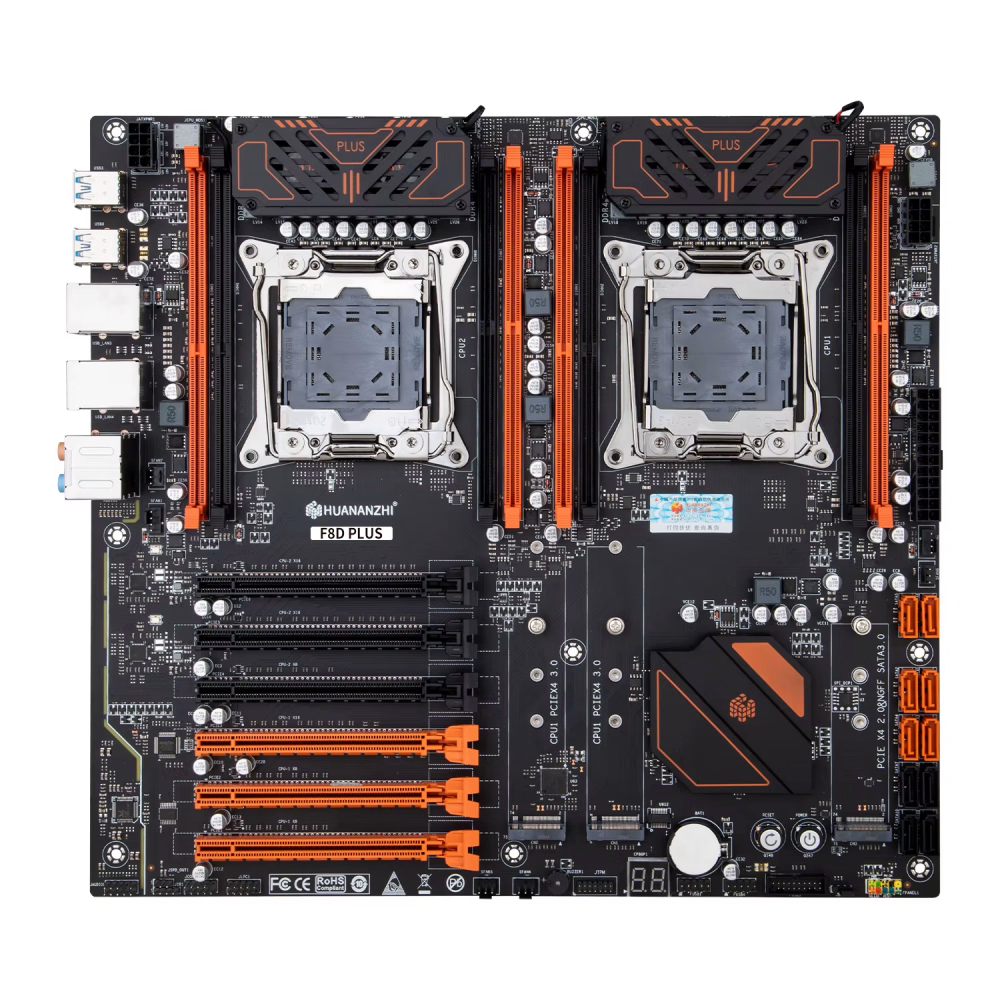
The Dual-CPU Motherboard: Huananzhi F8D Plus
After waiting a week for the board to arrive, It turned out to be a dud. Thankfully, the replacement worked perfectly. Curious about the motherboard’s “X99” name, I asked the manufacturer why it was called X99 if it didn't have an X99 chipset on it. Their response was: “It’s just the name of the board. The C612 is the same as the X99.” An odd explanation, considering the X99 chipset doesn’t support multiple CPUs. This company sells motherboards for as little as $40, salvaging C612 chipsets from old servers. As such, many of their boards are only compatible with Xeon or i7-5xxx and -6xxx CPUs using the 2011-3 socket. The i7s don't have support for multiple CPUs.
The Xeons have 40 PCI-E lanes each, and all 80 PCI-E lanes are used for PCI-E card slots (PCI-E v3.0): three x16 slots, three x8 slots, and four lanes each for the two m.2 NVMe sockets. There’s also a third m.2 NVMe/NGFF, which uses PCI-E 2.0 and one SSATA port for NGFF. The PCI-E 2.0 comes from the C612 - I don't know where the PCI-E 3.0 comes from. Don't use a Samsung 9100 Pro in any of these m.2 sockets, as its performance will be underwhelming. I have a 980 and a 990, and they don't run full speed.
The board has eight DDR4 memory sockets supporting up to 512 GB. For optimal performance, populate all eight slots with identical capacity, CL, and clock speed. If you have six sticks, distribute them evenly—three per CPU—and set the BIOS to 1-way or 3-way interleave. I used 8x 8 GB sticks for a total of 64 GB. Since I filled all the slots, I configured the memory interleave to the highest (4-way) in the BIOS. The red memory sockets are number 0 and 1, so populate them first, if you only have four sticks.
For memory, I used CMS DDR4 2400 MHz 32 GB (4x8 GB) non-ECC DIMMs originally intended for an ASRock Z390 motherboard, as "compatible" modules for these budget boards weren’t readily available. Speaking of budget, $125 for this board is far cheaper than the nearest competitor, priced at around $500 but lacking similar features. Newegg now sells them for $337.00, shipping from The USA. Still a good deal, but if you want to get them for less, you can find them on AliExpress for $122 to $129 on sale. And they ship from the USA.
Huananzhi X99-F8D PLUS for $129. Ships from USA This does not mean you will get it quickly - it means that you won't have to deal with customs. It takes 3 to 11 days to get it, but it's worth it for the convenience. I guess 3 days if it is in stock in the USA warehouse, 11 days otherwise.
Key Features
- 2x CPU 2011-3 sockets
- 6x SATA and 4x SSATA ports
- 3x PCI-E x16 slots
- 3x PCI-E x8 slots
- 2x 2.5 G Ethernet ports
- 2x NVMe (PCI-E 3.0) locations
- 1x NVMe/NGFF (PCI-E 2.0/SSATA) location
One thing that bears mentioning is the spacing between the CPUs, and the memory slots. They are all really close. Many 2011-3 coolers won’t fit. Noctua makes a compatible cooler available on Amazon and Newegg. At 110 mm tall, it fits, is just over the 2011-3 socket site size, and has sufficient cooling capacity. The two coolers keep my CPUs' idle temp at ~23.6°C and full load at ~53°C. If you can find a less expensive cooler, you can save a few bucks. The Noctua cooler just barely touches a memory stick. A tiny piece of electrical tape on the corner of the cooler would solve that, but it looks like it doesn't always touch. The coolers come with a very long allen key, and have slots on the corners to allow you to reach the screws easily.
Form Factor and Installation
The manufacturer describes the motherboard as “standard E-ATX,” which is misleading since there’s no standard definition for E-ATX. This board is actually SSI-EEB-sized, with the mounting holes to prove it. To house this 330 mm-wide board, you’ll need a case explicitly designed to support EEB. My older case didn’t fit, so I improvised by drilling additional mounting holes. The only readily available case I found that officially supports EEB was the Montech AIR 903. It accommodates ATX, Micro-ATX, Mini-ITX, SSI-EEB, and so-called E-ATX boards (though the meaning of E-ATX varies).
For comparison, my workstation motherboard, also labeled as “E-ATX,” is only 0.6 inches wider than ATX, while this server motherboard is 2.8 inches wider. Both cannot fit the same “E-ATX” label. I’m now transitioning to smaller cases painted white for better visibility during wiring. White-on-white is much easier to see than black-on-black, especially for aging eyes. Unfortunately, a smaller case doesn’t mean a lighter system—it still weighs the same.
The motherboard occupies nearly the entire pan. It hits on the back and bottom, covers all motherboard wiring openings, and requires 9 mounting posts. Fortunately you can run cables under the motherboard.
The CPUs
The motherboard supports E5-26xx V3 or V4 CPUs, compatible with its 2011-3 sockets. Both CPUs must be identical, as must the RAM configuration, ensuring uniform behavior across the system. While a few settings are configured per CPU, most, including memory interleaving, are global and must remain consistent to ensure proper functionality.
I dedicated several days to analyzing charts, benchmarks, and Intel documentation, searching for a balance where single-core performance wasn’t completely sacrificed for multi-threading capabilities. I concluded that the E5-2698 V3 represents this sweet spot. To explore further, I also acquired a pair of 14-core CPUs, providing options for 12, 14, and 16 cores to test with. While the E5-2697A V4 offers better performance with its 16 cores, 2.6 GHz clock speed, and faster execution times, a pair of CPUs costs $72. EDIT: I recently got a pair of E5-2697A V4 CPUs, and I'm testing them out.
Benchmarks and Power Consumption
To measure total power consumption, I conducted benchmarks using the Blender test. For comparison, I also ran the same test on my i9-12900K, having 128 GB of RAM and an RX 6600 XT video card. The results were as follows:
- i9-12900K: Consumed 343 watts with a benchmark score of 414 @ 50.2°C.
Power measurements were taken from the AC line to account for total system consumption. For temperature, I followed the average across all cores of both CPUs, and the peak average temperature reached during the benchmark.
Passmark difference scores are relative to the E5-2697A V4.
| CPU | Cost (pair) |
Total Cores :Threads |
Clock | Avg Temp |
Total Watts |
CPU TDP |
Blender Overall |
Passmark | |||
|---|---|---|---|---|---|---|---|---|---|---|---|
| Single Thread |
Multi Thread |
Single Diff |
Multi Diff |
||||||||
| E5-2690 V3 | $19 | 24:48 | 2.6 GHz | 63.2°C | 401 | 270 | 385.78 | 1915 | 16007 | -8.7% | -25.9% |
| E5-2695 V3 | $20 | 28:56 | 2.3 GHz | 55.1°C | 352 | 270 | 388.96 | 1790 | 16528 | -14.9% | -23.3% |
| E5-2698 V3 | $13 | 32:64 | 2.3 GHz | 53.1°C | 415 | 270 | 436.25 | 1935 | 18842 | -7.6% | -12.8% |
| E5-2697A V4 | $72 | 32:64 | 2.6 GHz | 49.8°C | 382 | 290 | 532.59 | 2098 | 21588 | 0.0% | 0.0% |
|
|||||||||||
I went with the E5-2697A v4. Its performance is far and away the best of the four CPUs. Not to be confused with the E5-2697 v4, which is a slow 18 core CPU. Watch out on ebay - some sellers don't know what they're selling. They think they're selling a 2697A v4, but they're actually selling an E5-2697 v4. I got mine from Keystone Memory (keystonememory). They were shipped in black-foam-lined plastic containers, bubble envelopes, and sent in a bubble mailer. Best packing I've seen for a CPU.
Contrary to some uninformed posts on Reddit and other forums, the V4 CPUs do not require ECC memory with this motherboard, although they do support it, and the motherboard does as well.
Case
The case is great, with phenomenal airflow, but the EEB-size motherboard covers all the cable routing holes on the motherboard pan. I had to install the cables before the motherboard, and doing that with the stiff extensions proved to be a challenge. That was also my first time dressing up the cables. It shows in the final result. When I do the workstation I'll try to do better, but there won't be the huge motherboard to contend with. EDIT: The workstation has a motherboard with a steel plate on the bottom. There was only 1 mm or so space under the MB. And being an "E-ATX", it covered the holes in the back pan. I had to route all cables through slots at the top and the bottom.
Side note. If you get this case, and if you lose track of the top filter, before tearing the room apart looking for it, look on the metal side of the case. The filter is magnetic. The filter on the top is controversial. It filters the air leaving the case. There is no filter on the front, where the air comes in. I put some filters on the fans and then a filter inside the entire front. It cuts the airflow a bit, but the airflow in this case is so unbelievably strong that losing a percentage makes little practical difference. The reduced airflow is more than made up for by the lack of problem-causing dust on the VRMs, fans and heatsinks. When I tore my workstation apart, there was dust caked on the radiator, blocking much of the airflow. I hope the filters stop that.
I put both systems on little wheeled carts which keep them 4" or so off the floor, and make it easy to get them out to work on them. The two display port cables and one USB cable run in a white nylon cable wrap. Moving the system involves unplugging those three cables and the power cord, and moving the cart.
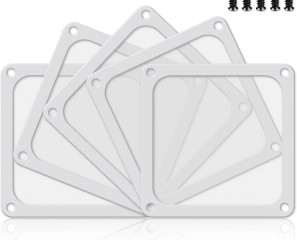
If you use the nylon screens in a PVC frame, buy twice as many as you need, and sort them into two equal stacks - the tighter ones and the looser ones. Then, using a sharp X-Acto knife, cut the screen out of the loose ones and use the frames as a spacer for the tight ones. You can also cut just one edge of the screen and use your finger to pull the entire screen out. Without the spacer, the filter net hits the center hub of the fan causing a whining noise and could damage the fan if the nylon becomes torn.

Another option is to get some PVC perforated screens from Amazon, and use them on the fan-side of the nylon net screen. It stops the problem but eats a lot more airflow. I did the spacers on one system and the PVC screen backing on the other. I'm in the process of making the server the same as the workstation, using the perforated PVC screens behind the nylon net screens. I may cut the PVC screens out and just leave an "X" pattern. I just need to keep the center from hitting the fan.
Cost
| Item | Cost | Description |
|---|---|---|
| Motherboard | $125 | Huananzhi X99 F8D Plus dual Xeon motherboard. ($337@Newegg&USA $129@AliExpress&USA) |
| 64 GB Memory | $212 | CMS DDR4-19200 2400 MHz 32 GB for each CPU (4x 8 GB) CL17, X8, 1.2V, Unbuffered, DIMM total 64 GB. Newegg |
| 2x CPU coolers | $120 | Noctua NH-D9DX i4 3U the only one that would fit with the CPUs being so close. ($120-$260@Newegg or $120@Amazon) |
| 2x E5-2698 V3 | $13 | 16-core 32-thread Xeon ebay |
| Case | $65 | Montech AIR 903 Base White Newegg or Amazon (Amazon delivery takes 6 days longer. They get it from Newegg) |
| PSU | $80 | Cooler Master MWE Gold 850 V2 Fully Modular. Newegg. I'm not saying this is the only PSU, but it's 850 W and inexpensive. |
| 2x 140 mm Fans | $35 | Corsair non-ARGB white fans for the top of the case. Newegg or Amazon |
| 2x 120 mm Fans | $30 | Corsair non-ARGB white fans for the bottom of the case. Newegg or Amazon |
| Fan Hub | $11 | EZDIY-FAB 10-port splitter. There are 9-fans - 7-case fans, 2-CPU fans. Amazon |
| Total | $691 |
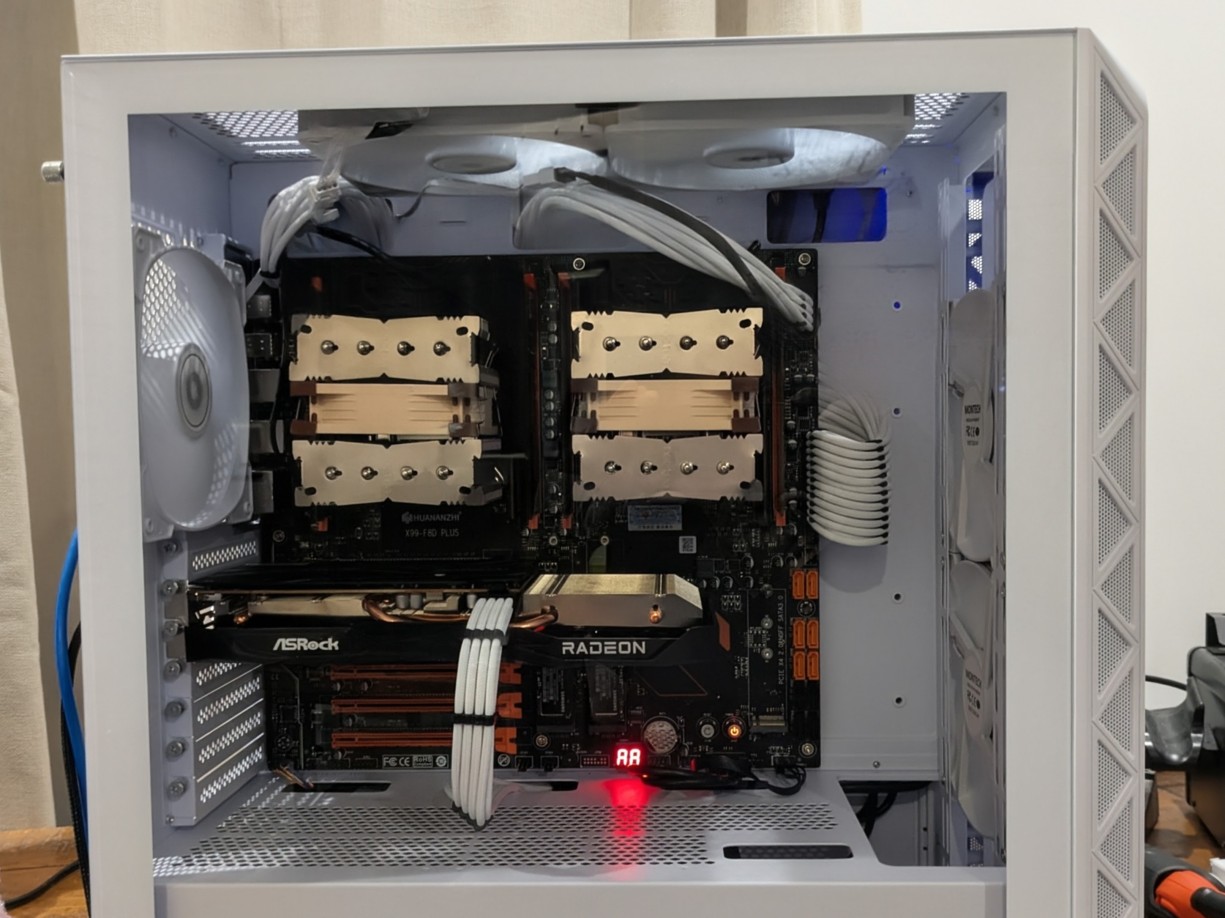
The photograph was taken before the two 120 mm fans were added to the top of the power supply box. You may notice by the picture that I missed one standoff by the SATA connectors. An oversight. I remembered to put it in, but then forgot. It took a while to get the motherboard installed, and I wasn't about to take it out and put it in again.
That's if you have to buy everything. I bought everything. The power supply only because the old PSU was missing the SATA power cables. The SATA power drives the fan hub. I was lucky to start buying pieces during November at Newegg. Everything was marked down. For instance the RAM I paid $212 for went up to $560 after the sales were over, and the price of the motherboard went up to $337, then down to $219 a few days later, then back up to $337. It is shipped from the USA.
You may notice I did not include a video card of any kind. I had an ASRock RX-6600 in the old server. I don't think of servers as having fancy video cards, but I had it. You might want a $30 video card or a $3000 video card – I don't know. Pick what you think you'll need. It takes very little for a server. I run the same OS on the server as on the workstation, so a similar card made some sense for me. Keep in mind the motherboard supports PCI-E 3.0. No sense in getting a video card that supports PCI-E 5.0. It will work, but it's a waste of money.
Also salvaged from the old server were 2x 1 TB NVMe SSDs.
With some of the money I saved on the dinosaur technology I was able to buy a new case and 360 mm AIO for my workstation, and power supply cable extensions for both systems. Watch out for price gouging on those. You can get 16 ga dual CPU sets from Amazon for $30. I didn't find any with 2 CPU cables at Newegg.
Performance is very much improved since the upgrade from single to dual E5-2690 V3s and even better when I changed to the E5-2698 V3s. As seen above, the dual E5-2698 V3 outperforms the i9-12900K in the Blender test 436 to 414, but it is a power hog. Idle power consumption on the server is around 100 watts, while on the workstation it is around 85 watts. I attribute that to the fact that the idle clock on the i9 is 800 MHz while the idle clock on the Xeon is 1.2 GHz, and there are 2 of them.
If you made it this far, you are probably interested in building a dual CPU server. I did not scrimp on parts. The motherboard was a gamble, but it turned out ok. You can find fans and coolers cheaper than my prices, certainly in November, and probably throughout the year, and you are likely to have some parts lying about. You may decide you don't need so many fans. The 850 W PSU is a little overkill. You need at least the power listed on the chart up above, plus 30% or so, depending on the amount of RAM, SSDs, etc. 500 W minimum - 650 W would be better, assuming you have a medium graphics card of some type in there. Just the CPUs add up to 270 to 290 watts.
The server is fast, and the network speed is astronomical. Running Git is instantaneous, as is ftp. I'm really happy with the way this project turned out. It also allowed me to up my entire office network to 2.5G.
Appendix A
The BIOS has diagnostics, and a 2 digit display that shows codes for each step in the initialization phase. The codes are generally errors if the display stops on them, otherwise they show the phase the BIOS is in:
| Problem | Status Codes |
|---|---|
| CPU Error | 00, C0, CF, D0, F1, FF |
| DRAM Error | 01, 62, 64, 69, 6F, A7, B0, B4, B7, B9, BA, C1, C6, D3, D4, D8, E1 |
| Graphics Card Error | 0A, 0B, 0D, 24, 25, 26, 2A, 2B, 31, A6, AE, B2, D6 |
| BIOS Check Error | C1, C6, 01, 02, 19 |
| POST Finished Without Error | 40, 4E, 55, 73, AA |
| Hard disk or Graphics card error | A6, AB, AE |
| OS Not Installed | AE |
| DRAM Clock is Too High | BF |
| Incompatible DRAM | B1 |
| DRAM Error | 67 |
| DRAM Not Installed | 53 |
| CPU Error | 91 |
I don't know where these codes came from; I saw a screenshot of a webpage. I got about half of these codes on the first motherboard I got. The working board goes through dozens of codes before landing on "AA". Then the OS boots. Several codes, A6, AE, C1, C6, are duplicated because different errors can result in the same code.